Check Server (required)
- After the player logs in successfully and selects a server, call this method when the player clicks the “Start Game” button. It checks whether the selected server is available and records the player's login server information. The game can be entered only when the server is available. If the current server is under maintenance, the SDK displays a maintenance prompt and returns an error. The game should remain on the current page and stop the subsequent game-entry logic, so that the player can select another server or wait for the server to reopen.
- The server information passed to this method must be the server used during the player's most recent login. When the game uses its own server-selection page, be sure to pass the correct serverid. The SDK uses this serverid to check the server status in the SDK backend.
Image
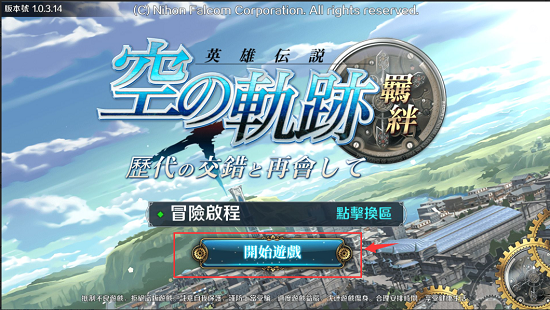
- As shown in the diagram, call this method when the player clicks the “Start Game” button to check the selected server's status.
Function
- Method 1
java
public static void gamedreamerCheckServer(Context context,HashMap<String,String> map,GamedreamerCheckServerListener gamedreamerCheckServerListener)- Method 2
java
public static void gamedreamerCheckServer(final Context context,final HashMap<String,String> map, GamedreamerCheckServerControlByGameListener gamedreamerCheckServerListener)- Method 1 description: The listener triggers a callback only when the server status is available. The SDK displays a dialog to notify the player when the check fails.
- Method 2 description: Call this method when the game needs to handle logic after a failed server check. Its listener triggers callbacks for both successful and failed checks. When this method is used, the SDK does not handle a failed check; the game must notify the player itself.
- Call either method according to the game requirements. Regardless of which method is used, enter the game only in the successful server-check callback.
Method 1 Parameters
| Parameter | Description |
|---|---|
| context | Context object. |
| map | The map must contain GDValues.USERID and GDValues.SERVERCODE. Their values are the SDK user ID and the serverCode of the server to check, respectively. After v1.5.38, GDValues.USERID can be omitted. |
| gamedreamerCheckServerListener | Check server listener. |
onCheckServer Callback Description
GamedreamerCheckServerListener.onCheckServer() callback method description:
- Called when the server status is available. Returned parameter description:
| Parameter | Description |
|---|---|
| server | Server information with an available status. The game must save this Server object and use it to replace the Server object saved at login or when the player switches servers. |
Example Code
java
// Required: Call the GDSDK check server interface when the player clicks “Enter Game”.
HashMap<String, String> map = new HashMap<String, String>();
map.put(GDValues.USER_ID, gdUser.getUserId());
map.put(GDValues.SERVER_CODE, gdServer.getServercode());
GDSDK.gamedreamerCheckServer(this, map, new GamedreamerCheckServerListener() {

	@Override
	public void onCheckServer(Server server) {
		// The server status is available; enter the game page in this callback.
	}
});
Method 2 Parameters
| Parameter | Description |
|---|---|
| context | Context object. |
| map | The map must contain GDValues.USERID and GDValues.SERVERCODE. Their values are the SDK user ID and the serverCode of the server to check, respectively. After v1.5.38, GDValues.USERID can be omitted. |
| gamedreamerCheckServerControlByGameListenerr | Check server listener. |
Callback Description
GamedreamerCheckServerListener.GamedreamerCheckServerControlByGameListenerr callback method description:
- onCheckServerSuccess(Server server) callback: Called when the server status is available. The game must save this Server object and use it to replace the Server object saved at login or when the player switches servers. onCheckServerFail(String failMsg) callback: Called when the server status is unavailable or the check fails. failMsg contains the failure message.
Example Code
java
// Required: Call the GDSDK check server interface when the player clicks “Enter Game”.
HashMap<String, String> map = new HashMap<String, String>();
//map.put(GDValues.USER_ID, gdUser.getUserId());
map.put(GDValues.SERVER_CODE, gdServer.getServercode());
GDSDK.gamedreamerCheckServer(this, map, new GamedreamerCheckServerControlByGameListener() {

	@Override
	public void onCheckServerSuccess(Server server) {
		// The server status is available; enter the game page in this callback.
		Intent intent = new Intent(BeginActivity.this, GameActivity.class);
		intent.putExtra(GDValues.USER, gdUser);
		intent.putExtra(GDValues.SERVER, server);
		startActivity(intent);
		BeginActivity.this.finish();
	}

	@Override
	public void onCheckServerFail(String failMsg) {
		// The server status is unavailable. Handle game logic here; do not enter the game page. failMsg contains the error message.
		Toast.makeText(BeginActivity.this, failMsg, Toast.LENGTH_LONG).show();
	}
});